



Inside the LiveTube app
Your phone, live on air

Filmed on a phone. Verified by our newsroom. On air in seconds.
LiveTubeBreaking news.Filmed by you.Verified live.
Go live from your phone. Our newsroom verifies what you are filming, a producer approves it, and you get paid for every minute on air.
Before the world believes a live video, someone has to know it's real.
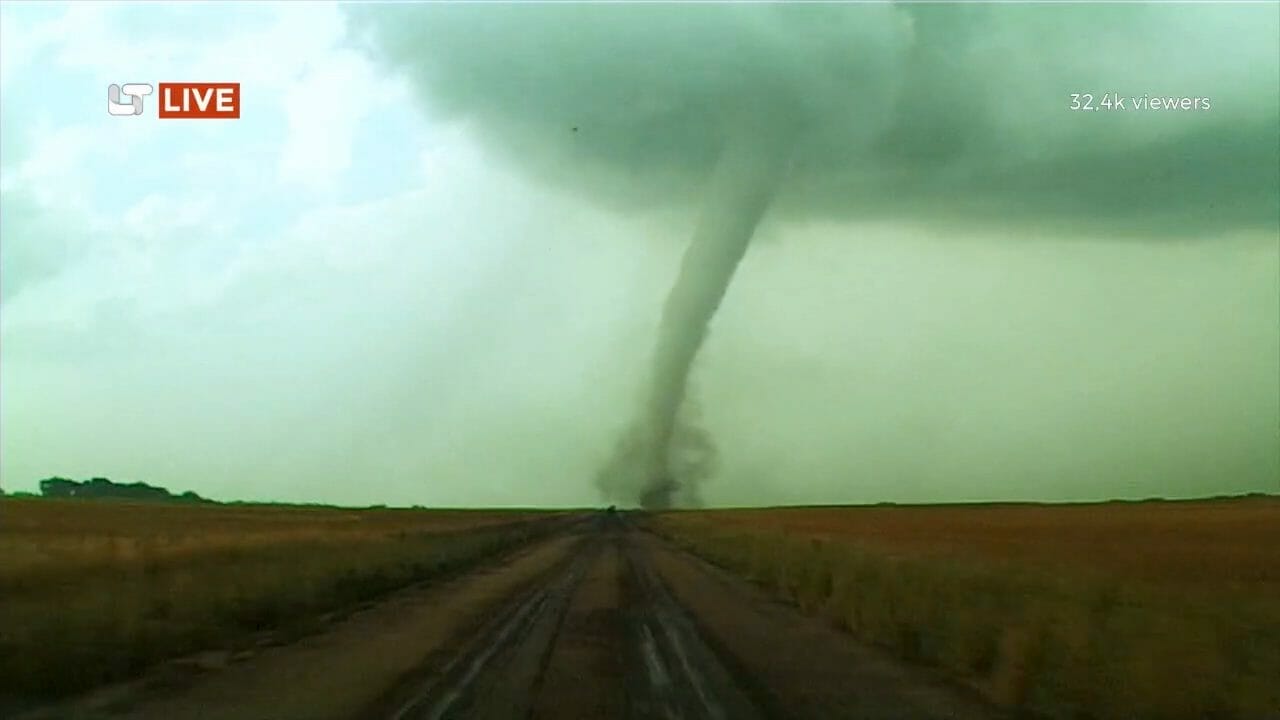
The internet is flooded with manipulated and synthetic content. LiveTube answers with the oldest tool journalism has: someone who is there, and a newsroom that checks the story while it is still happening.
Fake news does not need you to believe it. It only needs you to stop believing everything else.
Sven Herold, Founder and Editor in Chief, LiveTube
Social, but verified
Social platforms check content after publication, if at all. On LiveTube, automated checks test every stream while it runs, and a Producer, a professional journalist, approves it before it airs.
Mobile, but trusted
The speed of a phone, the discipline of a newsroom. A Producer is on every broadcast, a 30 second buffer lets them step in, and lower thirds are added as on any major broadcaster.
LiveTube is not another social platform. It is a newsroom for the smartphone age: anyone can report, professional journalists decide what airs, and the world watches it live.
You were there first
News breaks in front of people before it breaks on television. Point your phone at it and go live: a real newsroom takes the stream, a Producer puts it on air, and the world watches while it happens. No followers needed, no editing, no uploads. The pay follows for every minute you stay live.

Connect with our newsroom. When we decided to broadcast your live stream, we pay you. That's how simple it is. There's even a live chat for questions. So what are you waiting for? Grab your mobile, download the app, send us breaking news.
How it works for a reporter, in 60 seconds.
-
01
Download the app
Free on iOS and Android. Create your account in minutes.
-
02
Stream live
When news happens near you, open the app and GO LIVE.
-
03
Get verified
Automated checks test your stream as it runs. A Producer watches it, and publishes when satisfied.
-
04
Earn money
A base payment on publish, then more for every minute you stay on air.

New to reporting? Start with what makes a good LiveTube and our tips for live reporters.
What you earn
The rates are in the app, where they can move with the story and with your country. Terms of Service.
A protest, a flood, a local event: if you are there, it is worth streaming. Every LiveTube airs in the app, and through the LiveTube MediaHub your stream can reach newsrooms around the world.


-
01
You press GO LIVE
The stream leaves your phone immediately and lands in the LiveTube newsroom. Not on a feed, not on a homepage, not in front of an audience. And nothing waits on your device to be handed over later.
Product screen to supplyThe GO LIVE screen in the LiveTube app, a thumb on the button, the scene the reporter is looking at visible behind it.Portrait, 4:5 -
02
A Producer picks it up
A Producer watches the pictures as they arrive, works out what they actually show, and writes the title, the description and the tags. That is the newsroom’s job, not yours. Yours is to stay where the story is and keep streaming.
Photograph to supplyA Producer at the newsroom desk, the incoming feed on the monitor in front of them, typing the title while the stream runs.Portrait, 4:5 -
03
The Producer puts it on air
When the Producer is satisfied, they publish. A 30 second safety delay begins at that moment and stays there as an on-air buffer. Your broadcast is then live on LiveTube and in every newsroom subscribed to the LiveTube MediaHub.
Product screen to supplyThe published broadcast running in the LiveTube player on a phone, held in one hand, the newsroom title visible.Portrait, 4:5 -
04
The broadcast pays you
A base payment the moment a Producer publishes it, then a further amount for every minute you stay on air. Special Pay raises both. The rates are in the app, where they can move with the story.
Product screen to supplyThe reporter’s earnings screen in the LiveTube app, showing the base payment line and the per minute line for one broadcast.Portrait, 4:5
People trust people
A LiveTube is not uploaded, then checked, then released. You are on air while a Producer works on the stream and viewers are already watching. LiveTube is the first mobile platform to verify news live, while it is happening.

- On the scene. Streaming from where it is happening, so there is no gap for the story to go cold in.
- In the newsroom. A Producer watches the pictures as they arrive and decides what airs.
- On every screen. Viewers and subscribing newsrooms see the same stream on the safety delay, while it is still going on.
One stream. One clock. There is only ever one broadcast, not three stages of one.
Every LiveTube that goes to air carries its location, its time and its status. A broadcaster pulling the feed into their gallery sees exactly what the Producer saw. Nothing has to be taken on trust.
Six commitments govern every broadcast, from safety first to strict rules: safety, independence, no fake news, paid reporting, quality, and rules that are enforced.
Latest LIVE videos
Live and recently live in the LiveTube Newsroom: our broadcasts alongside live coverage from agencies around the world.
Loading the latest live streams.
The next one will not wait for you.
 LiveTube
My Alerts: you choose what gets through
Subscribe to categories, reporters or upcoming events, then choose which of them can notify you. You hear when a story goes live, not when an algorithm decides.
LiveTubeClose To Me
Live streams from near your location, inside a radius you set yourself. If news breaks close enough to see, you are close enough to report it.
LiveTubeUpcoming LiveTubes
Scheduled coverage sits in the app with a countdown before it begins. Subscribe, and your phone tells you the moment the story actually starts.

For media:
verified live news, ready to take to air

Automated checks test every stream against real world data while it runs, air traffic, seismic and weather sources among them, and a LiveTube Producer approves it before it airs.
Through the LiveTube MediaHub, a newsroom anywhere in the world can take a verified stream the moment it goes on air.
Live feeds integrate directly into your control room, with 20 second Live Snippets for instant breaking use while the stream is on air.
Full recordings and broadcast-quality 1080p HLS, 16:9 live and on demand, are ready the moment the broadcast ends.
The people who use it say it best.
Licensing terms are in the Media License.
What our LiveTubers say
New here? These pages tell the whole story
 Our StoryWhy LiveTube exists: a former broadcast journalist watched fact checking lose the race against fakes, and built a newsroom that verifies the story while it is still happening.
 Why Only Live Can Be VerifiedOnce an event is over, almost any clip can be edited, relabeled or faked. Live video verified in the moment is different: source proof from the scene, independent real time data, and editorial judgment while it happens.
 About LiveTubeBuilt by journalists, engineers and advocates of press freedom: the first mobile platform to verify news live, while it is happening rather than after it is uploaded.
 Where to WatchEverything, live and as a replay, in the free LiveTube app. Selected live coverage also runs on the LiveTube Newsroom in your browser and on our social channels.
 How It WorksWhen news breaks near you, open the free app and go live. The newsroom reviews every stream in real time, and if yours is selected for broadcast, you get paid.How It Works for MediaVerified live streams delivered as a clean 1080p HLS feed, with 20 second Live Snippets while a story runs and the full recording ready to download the moment it ends.
Ready to make a difference in live news?
The LiveTube app is free on iOS and Android, with no in app purchases and no hidden costs. Download it today, and you are ready the moment news breaks near you. Questions? The LiveTube Help Hub has the answers. And if you want to help build LiveTube itself, we are hiring.